Arrivals Reports Detailed and Summary
Report parameters
|
Field |
Description |
|---|---|
|
Report Name |
The name of the report. |
|
Detail |
Select this option to generate a detailed arrivals report. |
|
Summary |
Select this option to generate a summarised arrivals report. |
|
Separate By Building Code |
When enabled, the system separates the records by building type in the report. |
|
Start Date |
The start date from when the data must be considered for generating the report. |
|
End Date |
The end date until when the data must be considered for generating the report. |
|
Report Options |
Available options include the following:
|
|
Sort Options |
Available options include the following:
|
|
Print Red Flag Guest Comments |
When enabled, the system includes red flag guest comments in the report. |
|
Show Previous Stay Information |
When enabled, the system includes details of previous stay in the report. |
|
Select Rate Types To Exclude |
A drop-down list consisting of all rate types. Users can select multiple or all the available rate types from the list to be excluded in the report generated. |
|
Building Codes |
A drop-down list consisting of all the building codes. All building records created in the Building Codes (Settings à Setup à Room à Building Codes) screen are displayed as options in the drop-down list. Users can select multiple or all the building codes from the list to be displayed in the report generated. |
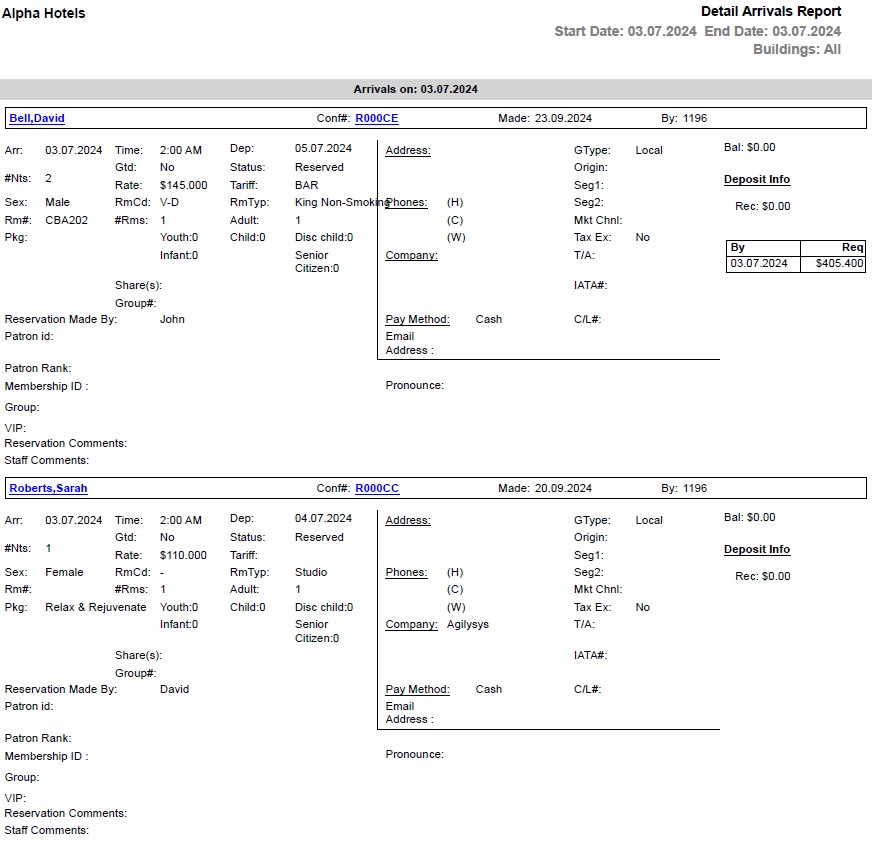
Sample Report - Detail Arrivals Report
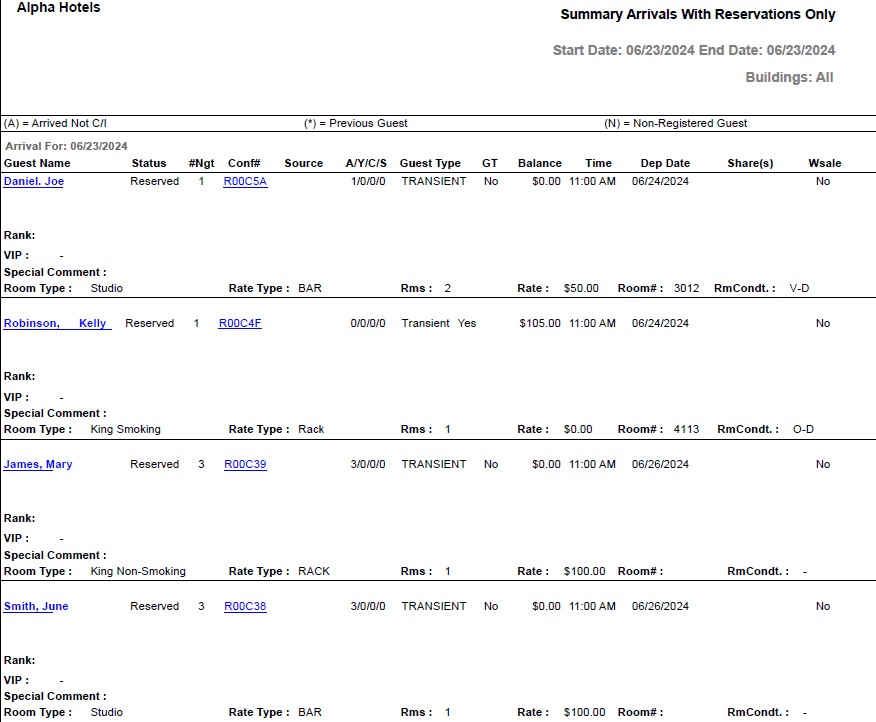
Sample Report - Summary Arrivals Report
Report Fields
|
Field |
Description |
|---|---|
|
Guest Name |
The first name and last name of the guest will appear as a hyperlink and clicking it will navigate the user to the guest record. |
|
Arrivals on |
The date for which the details of guest arrivals are displayed. However, the title of this field in Summary arrivals report is Arrivals For. |
|
Conf# |
The confirmation number of the reservation will appear as a hyperlink and clicking it will navigate the user to the reservation record. |
|
Made |
The date on which the reservation was created. |
|
By |
User ID of the user who created the reservation. |
|
Arr |
The arrival date of the guest. |
|
Time |
The arrival time of the guest. |
|
Dep |
The departure date of the guest. |
|
#NTS |
The number of nights of stay. However, the title of this field in Summary arrivals report is #Ngt. |
|
GTD |
Indicates whether the guest reservation is guaranteed. |
|
Status |
The status of the reservation. |
|
VIP |
The code that identifies the VIP type of the guest at the property. |
|
Rate |
The rate defined for the selected room type. |
|
Tariff |
The tariff of the preferred room type. |
|
Sex |
Gender of the guest. |
|
RmCondt |
The condition of the room. However, the title of this field in Detail arrivals report is RmCd. |
|
Room Type |
The room type to which the room number belongs. However, the title of this field in Detail arrivals report is RmTyp. |
|
Room# |
The room number of the guest. However, the title of this field in Detail arrivals report is Rm#. |
|
#Rms |
Number of rooms associated with the reservation. |
|
#A |
The number of adults on the reservation. |
|
#Y |
The number of youths on the reservation. |
|
Pkg |
The package selected for the reservation. |
|
Shares |
The name (last name followed by first name) of the guest with whom the reservation is shared. If the reservation is shared with multiple guests, names of all guests will be displayed separated by commas. |
|
Reservation Made By |
The name of the user who created the reservation record. |
|
Patron ID |
The patron ID of the guest. |
|
Patron Rank |
The rank status of the patron. |
|
Group |
In case of group reservations, the booking name of the group is displayed here. |
|
Group# |
In case of group reservations, the booking ID of the group is displayed here. |
|
Comments |
Comments entered by the user, if any. |
|
Address |
The contact address of the guest. |
|
Phones |
|
|
H |
The home phone number of the guest. |
|
C |
The mobile number of the guest. |
|
W |
The work phone number of the guest. |
|
Company |
The name of the company to which the guest belongs. |
|
Pay Method |
The payment method associated with the transactions. Example: Cash, Master card. |
|
GType |
The guest type selected when creating the reservation. |
|
Origin |
Indicates the guest’s origin, that is, where the guest came from or heard about the property. |
|
Seg1 |
The segment 1 code selected when creating the reservation. |
|
Seg2 |
The segment 2 code selected when creating the reservation. |
|
Tax Ex |
Indicates whether the guest type is tax exempted. |
|
T/A |
Indicates whether the reservation is made by a travel agent. |
|
IATA# |
The IATA number of a travel agent associated to the company. |
|
C/L # |
The reservation cancellation number. |
|
Grand total for The totals for date range selected in parameters. |
|
|
Total Rooms Reserved |
The total number of rooms reserved in the selected date range. |
|
Gtd Resv |
The total number of guaranteed room reservations. |
|
Non-Gtd Resv |
The total number of non-guaranteed room reservations. |
|
Total Reservations |
The total number of reservations in the selected date range. |
|
Total Room Revenue |
The sum of all revenue amounts earned. |
|
Total Adults |
The total number of adults in all the reservations. |
|
Total Youths |
The total number of youths in all the reservations. |
|
Total Children |
The total number of children in all the reservations. |
|
Total Guests |
The total number of guests in all the reservations. |
|
Guest Name |
The last name and first name of the guest. |
|
Balance |
The amount that must be received from the guest. |
|
Wsale |
Indicates whether the reservation is made by a wholesaler. |